
Building Resilient Applications with REST API Integration
Quick Answer: This guide teaches you proven architectural patterns for building applications that remain functional despite inevitable external API failures. You’ll learn when and how to implement retry logic, caching strategies, and graceful degradation.
Perfect for: Backend developers, API integrators, architects, and anyone building production applications that depend on third-party REST APIs.
Time to complete: 25 minutes
Difficulty: Intermediate
Stack: Language-agnostic architectural patterns applicable to any REST API integration
What You’ll Learn
Section titled “What You’ll Learn”Modern applications increasingly depend on external REST APIs for critical functionality. Whether you’re retrieving data from third-party services, integrating payment processors, or consuming cloud-based AI models, your application’s reliability is intrinsically tied to the stability of these external dependencies.
The challenge: external APIs will fail. This isn’t a possibility—it’s a certainty. Understanding how to build applications that remain functional despite these inevitable failures is essential for production-ready software.
By the end of this guide, you’ll understand:
- How to architect applications with clear separation of concerns
- When and how to implement intelligent retry logic with exponential backoff
- How to design two-tier caching strategies for performance and resilience
- When to use background refresh mode for unpredictable traffic patterns
- How to implement graceful degradation for the best user experience
The Problem: External APIs Are Unreliable
Section titled “The Problem: External APIs Are Unreliable”When your application depends on external services, you inherit their reliability limitations. Even well-maintained APIs experience issues:
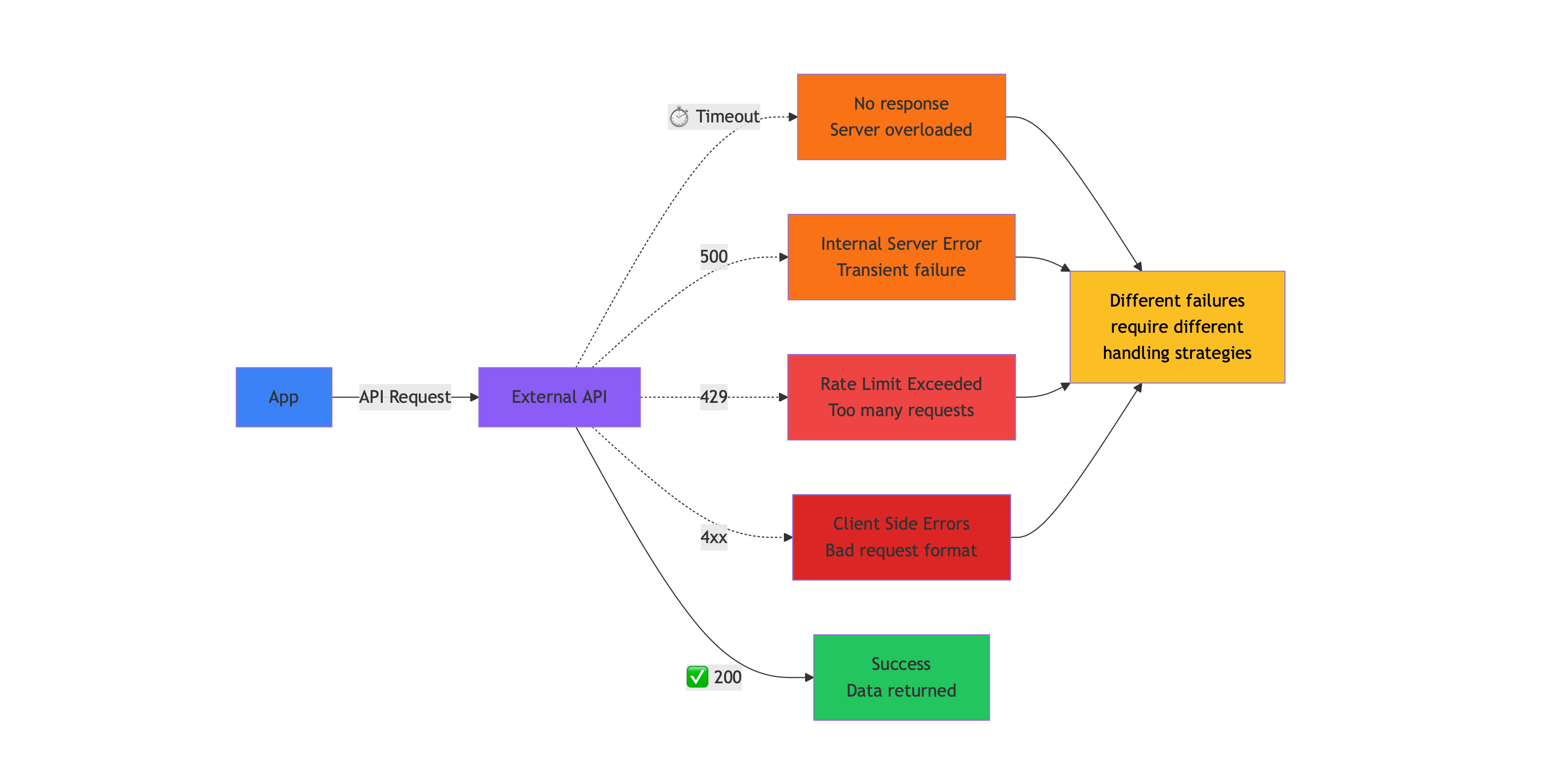
Common Failure Modes
Section titled “Common Failure Modes”Network Timeouts
The remote server doesn’t respond within your configured wait period. This can occur due to server overload, network congestion, or infrastructure issues beyond your control.
Rate Limiting (HTTP 429)
You’ve exceeded the API provider’s request quota. Most APIs implement rate limits to protect their infrastructure and ensure fair usage across customers. Limits might be per-second, per-minute, or per-day.
Server Errors (HTTP 5xx)
The API provider is experiencing internal problems. These range from database connectivity issues to application bugs to infrastructure outages.
Client Errors (HTTP 4xx)
Your request is malformed, unauthorized, or otherwise invalid. Unlike transient errors, these indicate problems with your implementation.
Each failure type has different characteristics and requires different handling strategies. A robust application distinguishes between these cases and responds appropriately.
Architectural Foundation: Separation of Concerns
Section titled “Architectural Foundation: Separation of Concerns”Before implementing resilience patterns, establish clear architectural boundaries. Mixing concerns—presentation logic with retry logic, business logic with caching—creates code that’s difficult to test, modify, and reason about.
Layered Architecture Pattern
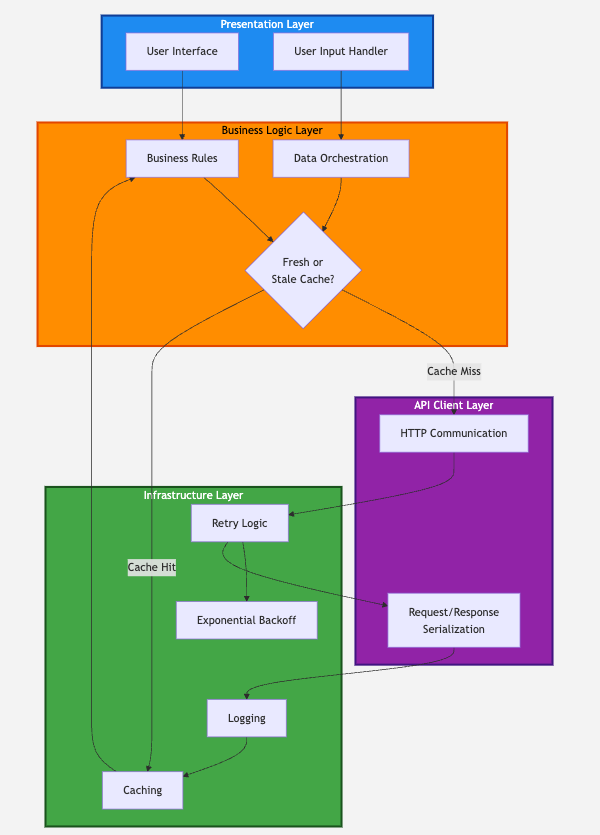
Section titled “Layered Architecture Pattern”Structure your application in distinct layers with well-defined responsibilities:
Presentation Layer
- Handles user interface and user interactions
- Displays data and captures input
- No knowledge of APIs, caching, or retry mechanisms
Business Logic Layer
- Implements application-specific rules and workflows
- Orchestrates data operations
- Decides when to use cache versus live data
API Client Layer
- Manages HTTP communication with external services
- Handles request/response serialization
- Contains no business logic or caching
Infrastructure Layer
- Provides cross-cutting concerns: retry logic, caching, logging
- Implemented as decorators, middleware, or utility functions
- Agnostic to specific business logic
This separation provides several benefits:
- Testability: Test each layer independently with mock dependencies
- Maintainability: Changes in one layer don’t cascade throughout the codebase
- Flexibility: Swap implementations (different cache backends, different APIs) without rewriting business logic
- Clarity: Each component has a single, well-defined purpose
Solution 1: Intelligent Retry Logic
Section titled “Solution 1: Intelligent Retry Logic”Transient failures often resolve themselves within seconds. A temporary network hiccup, a momentary server overload, or a brief infrastructure issue may disappear before a user could even react to an error message. Retry logic gives your application multiple opportunities to succeed before admitting defeat.
Error Classification
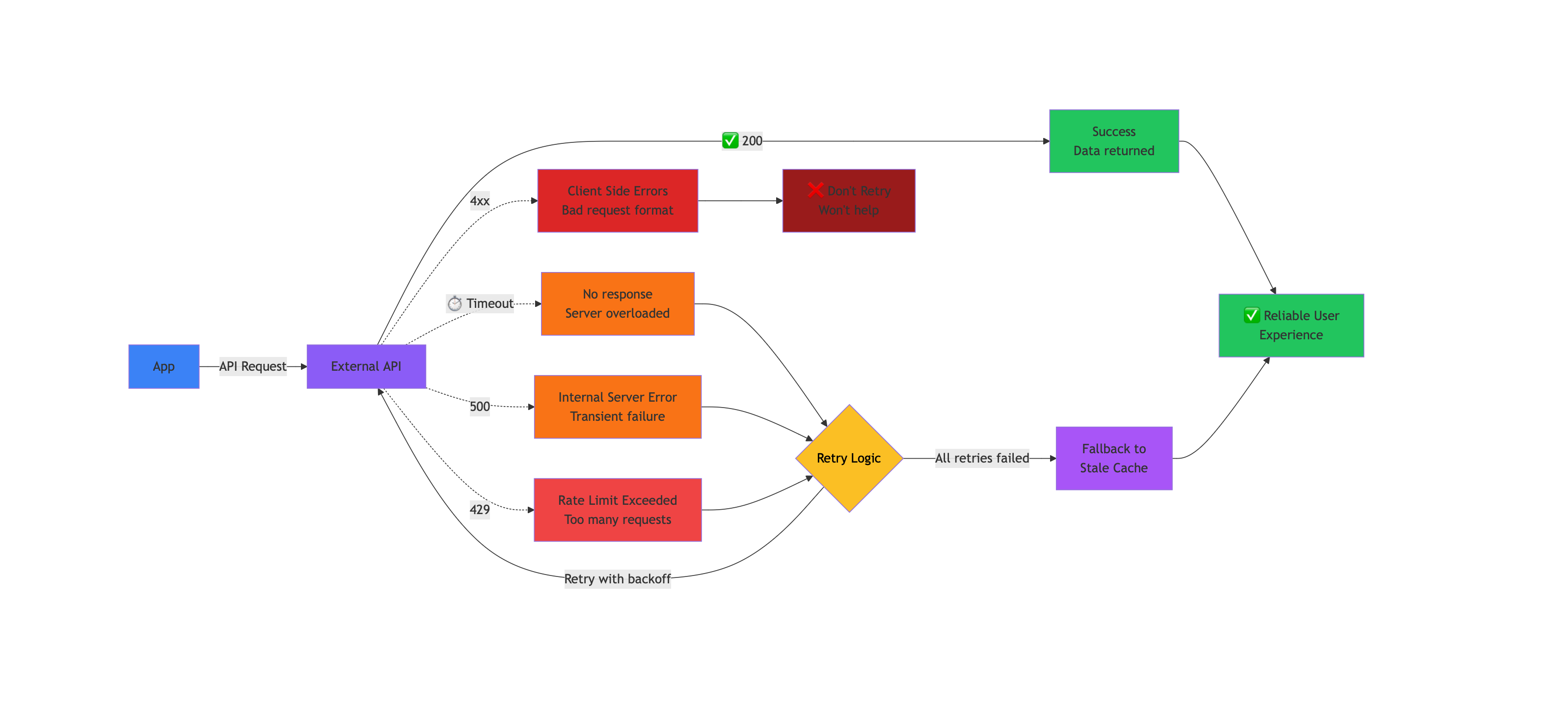
Section titled “Error Classification”Not all errors warrant retries. Your retry logic must distinguish between temporary problems and permanent failures:
Retry Candidates:
- Network timeouts and connection errors
- HTTP 429 (rate limiting)
- HTTP 5xx (server errors)
Don’t Retry:
- HTTP 4xx (except 429): client errors indicating bad requests, authentication failures, or resource not found
- These won’t resolve by trying again and may indicate bugs in your code
Exponential Backoff and Rate Limit Handling
Section titled “Exponential Backoff and Rate Limit Handling”When retrying, don’t immediately hammer the failing service. Exponential backoff introduces increasing delays between attempts, giving the remote system time to recover.
Basic exponential backoff:
Attempt 1: Wait 0.5 secondsAttempt 2: Wait 1 secondAttempt 3: Wait 2 secondsEach retry waits twice as long as the previous attempt. This pattern works well for transient errors like timeouts and 5xx responses.
Specialized Backoff for Rate Limits
Rate limits require different handling. If an API allows 5 requests per minute, retrying after 0.5 seconds will just hit the same limit again, wasting your retry attempts.
For rate limit errors:
- Use longer, fixed delays between attempts
- Calculate delay based on the API’s quota window
- Example: For a 5-requests-per-minute limit, wait at least 12-15 seconds between retries
This gives the API’s quota window time to reset, making your next attempt likely to succeed.
Maximum Retry Limits
Section titled “Maximum Retry Limits”Always limit retry attempts. Without a maximum, a persistently failing API could lock your application in an infinite retry loop. Three attempts is a common default, providing two retries after the initial failure while preventing excessive delays.
Solution 2: Smart Caching Strategy
Section titled “Solution 2: Smart Caching Strategy”Caching serves dual purposes in resilient applications: improving performance and providing fallback data when APIs fail. A sophisticated caching strategy recognizes these distinct use cases.
Two-Tier Cache Pattern
Section titled “Two-Tier Cache Pattern”Implement two methods for accessing cached data:
Fresh Data Access
Returns cached data only if it meets freshness requirements (e.g., less than 10 minutes old). If data is stale or missing, returns nothing, triggering a new API call. This serves normal operation when APIs are healthy.
Stale Data Access
Returns cached data regardless of age. Even hours-old data is acceptable. This serves as emergency fallback when APIs are unavailable. Stale data is better than no data.
Request Flow with Caching
Section titled “Request Flow with Caching”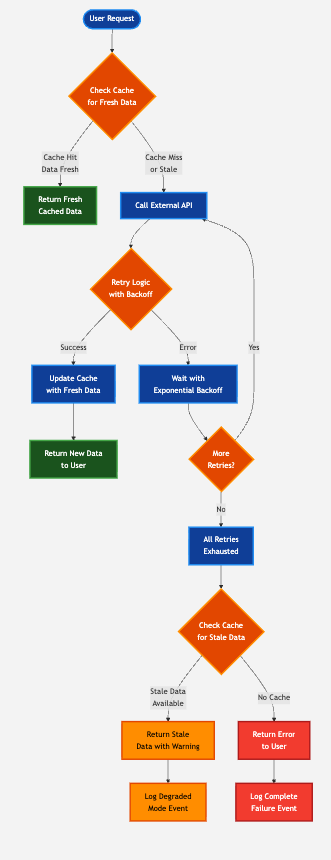
The complete request flow integrates caching with retry logic:
- Check cache for fresh data - If available, return immediately without calling API
- On cache miss, attempt API call - Use retry logic for transient failure handling
- On successful API call - Update cache with fresh data and return to user
- After all retries fail - Fall back to stale cache data
- Indicate data staleness - Inform users when they’re viewing outdated information
This flow provides graceful degradation: when external services fail completely, users still receive data, albeit outdated, rather than error messages.
Cache Benefits
Section titled “Cache Benefits”Beyond resilience, caching dramatically reduces API usage:
Repeated requests for the same data serve from cache rather than making new API calls. This:
- Reduces latency (cache reads are faster than network calls)
- Preserves API quota (fewer calls against rate limits)
- Lowers costs (pay-per-request APIs become cheaper)
- Reduces load on API providers
A well-implemented cache can reduce API calls by 50-80% depending on access patterns.
Cache Storage Considerations
Section titled “Cache Storage Considerations”Simple Applications:
- File-based caching (JSON, pickle files) works for single-server deployments
- Easy to implement, no additional infrastructure
- Simple to debug (inspect files directly)
- Limited to moderate scale
Production Applications:
- Distributed caches (Redis, Memcached) for multi-server deployments
- Faster access times
- Built-in expiration and eviction policies
- Supports high concurrency
Cache Invalidation:
Implement automatic cleanup to prevent unlimited growth:
- Time-based expiration (delete entries older than X hours/days)
- Size-based eviction (remove oldest entries when cache reaches size limit)
- Manual invalidation for critical updates
Solution 3: Background Refresh Mode
Section titled “Solution 3: Background Refresh Mode”For applications with unpredictable traffic patterns, user-triggered API calls create challenges around cost and quota management. Background refresh mode decouples user activity from API usage.
The Problem: User-Driven API Calls
Section titled “The Problem: User-Driven API Calls”In a traditional request-response model:
- User requests data
- Application checks cache
- On cache miss, application calls API
- Response cached and returned
This works well when traffic is predictable and controlled. But when you can’t predict user behavior:
A sudden traffic spike—hundreds of users arriving simultaneously after cache expiration—triggers hundreds of API calls within seconds. This can:
- Exhaust daily quotas instantly
- Trigger rate limiting that affects all users
- Generate unexpected costs on pay-per-request APIs
- Overwhelm the API provider’s infrastructure
Background Refresh Solution
Section titled “Background Refresh Solution”Background refresh mode separates data updates from user requests:
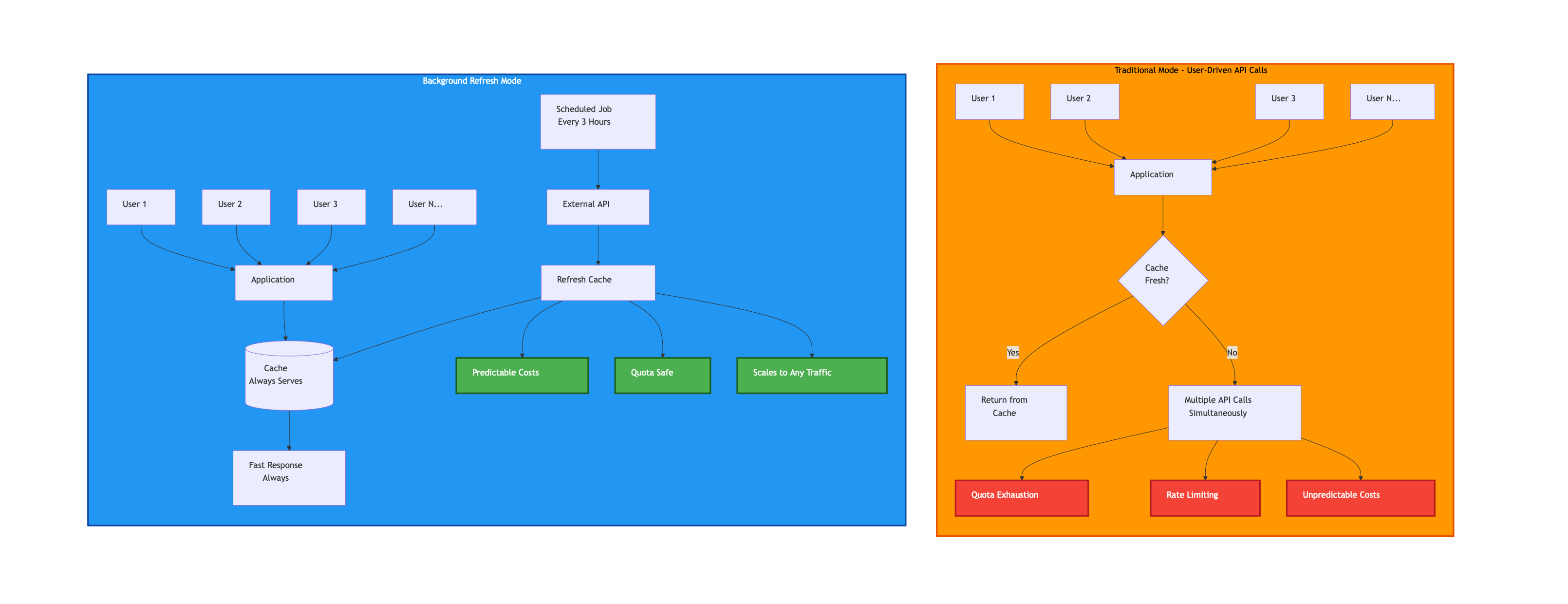
Scheduled Job:
- Runs on a fixed schedule (e.g., every 3 hours)
- Refreshes cache for all required data
- Makes a predictable number of API calls
- Independent of user traffic
Application:
- Always serves from cache
- Never makes direct API calls in response to user requests
- Handles any traffic volume with constant API usage
Tradeoff Analysis
Section titled “Tradeoff Analysis”Benefits:
- Predictable costs: API usage is constant regardless of traffic
- Quota safety: Never risk exhausting rate limits due to traffic spikes
- Consistent performance: Cache hits are always fast
- Scalability: Traffic can increase without increasing API costs
Tradeoffs:
- Data freshness: Users see data that’s potentially hours old
- Infrastructure complexity: Requires scheduled job infrastructure
- Not suitable for real-time: Inappropriate when current data is critical
When to Use Background Refresh
Section titled “When to Use Background Refresh”Background refresh mode is appropriate when:
- Traffic patterns are unpredictable
- Data doesn’t need to be real-time
- API costs or quotas are concerns
- You need predictable operational costs
- User experience tolerates some data staleness
Avoid background refresh when:
- Users require current, real-time data
- Traffic is predictable and controllable
- API quotas are generous relative to usage
- Data changes frequently and staleness is problematic
Implementation Options
Section titled “Implementation Options”Cron Jobs:
Traditional scheduled tasks on Unix/Linux servers. Simple, reliable, well-understood. Best for single-server deployments with straightforward scheduling needs.
Cloud Schedulers:
AWS Lambda with CloudWatch Events, Google Cloud Scheduler, Azure Functions with Timer Triggers. Serverless options that scale automatically. No server management required, pay only for execution time.
Task Queues:
Celery (Python), RQ (Python), Bull (Node.js), or cloud-native options like AWS SQS. More sophisticated scheduling with retry logic, monitoring, and distributed execution. Best for complex workflows with multiple interdependent tasks.
Graceful Degradation: The Ultimate Fallback
Section titled “Graceful Degradation: The Ultimate Fallback”When retries fail and caches are empty, your application faces a critical decision: crash or degrade functionality gracefully.
Graceful Degradation Principles
Section titled “Graceful Degradation Principles”Partial Functionality > No Functionality
If one of five API integrations fails, the other four should continue working. Don’t let a single failure cascade into total application failure. Isolate failures to specific features or components.
Stale Data > No Data
Show users outdated information with clear indication of its age. For most use cases, 2-hour-old data is more useful than an error message. Always attempt to serve cached data before showing errors.
Clear Communication
When degrading functionality:
- Inform users that data may be outdated
- Indicate when the system last successfully retrieved data
- Explain what functionality is currently limited
- Avoid technical jargon in user-facing messages
- Provide estimated time to recovery if known
Example message: “Showing news from 2 hours ago. We’re experiencing temporary issues refreshing data. Please check back in a few minutes.”
Maintain Core Workflows
Identify critical user workflows and ensure they remain functional even when secondary features fail. If displaying data is critical but refreshing data is secondary, prioritize the former.
Monitoring and Alerting
Section titled “Monitoring and Alerting”Graceful degradation shouldn’t be silent. Implement monitoring to detect when your application is operating in degraded mode:
- Log all fallback activations - Track when stale cache is used, when features are skipped
- Track retry exhaustion rates - Monitor how often retries fail completely
- Monitor cache hit/miss ratios - Detect degradation in cache effectiveness
- Alert on sustained degraded mode - Notify teams when degradation persists beyond acceptable thresholds
- Track API error rates by type - Identify patterns in 429s, 5xxs, timeouts
This visibility helps you:
- Respond to provider outages proactively
- Identify patterns in API failures
- Optimize retry and caching strategies based on real data
- Communicate accurate status to users during incidents
- Create SLOs and SLAs based on actual behavior
Monitoring Best Practices:
- Use structured logging (JSON) for easier parsing
- Include request IDs for tracing across systems
- Set up dashboards showing real-time degradation status
- Configure alerts with appropriate thresholds (don’t alert on every retry)
- Track metrics over time to identify trends
Combining Patterns for Maximum Resilience
Section titled “Combining Patterns for Maximum Resilience”These three patterns work synergistically:
Layer 1: Retry Logic
Handles transient failures automatically. Most temporary issues resolve within 3 attempts.
Layer 2: Fresh Caching
Reduces API load and provides fast responses for repeated requests. When APIs are healthy, improves performance.
Layer 3: Stale Cache Fallback
When retries are exhausted, provides degraded functionality rather than complete failure.
Layer 4: Background Refresh (Optional)
For unpredictable traffic, completely decouples API usage from user behavior.
Together, these layers create defense in depth. Multiple failures must occur simultaneously before users experience complete service disruption.
Implementation Checklist
Section titled “Implementation Checklist”When building applications with external API dependencies:
Architecture:
- ✓ Separate presentation, business logic, and API client layers
- ✓ Implement cross-cutting concerns (retry, caching) as infrastructure
Retry Logic:
- ✓ Classify errors into retry-worthy and permanent failures
- ✓ Implement exponential backoff for transient errors
- ✓ Use specialized backoff for rate limits
- ✓ Set maximum retry limits to prevent infinite loops
- ✓ Log retry attempts for debugging and monitoring
Caching:
- ✓ Implement both fresh and stale data access methods
- ✓ Choose appropriate cache storage for your scale
- ✓ Implement cache expiration and cleanup
- ✓ Cache successful API responses immediately
- ✓ Monitor cache hit rates
Graceful Degradation:
- ✓ Fall back to stale cache when retries fail
- ✓ Communicate data staleness to users
- ✓ Maintain partial functionality when possible
- ✓ Log degraded mode activations
Background Refresh (if needed):
- ✓ Implement scheduled cache refresh job
- ✓ Decouple user requests from API calls
- ✓ Choose appropriate refresh frequency
- ✓ Monitor refresh job success/failure
Monitoring:
- ✓ Track API error rates by type
- ✓ Monitor retry exhaustion
- ✓ Alert on sustained degraded mode
- ✓ Measure cache effectiveness
See These Principles in Action
Section titled “See These Principles in Action”For a complete implementation of these resilience patterns, see this example application that integrates multiple REST APIs including NewsDataHub:
Video Tutorial
Section titled “Video Tutorial”Source Code
Section titled “Source Code”GitHub Repository: Multi-API Financial Dashboard
The example demonstrates:
- Layered architecture with clear separation of concerns
- Intelligent retry logic with adaptive backoff strategies
- Two-tier caching with fresh and stale data access
- Background refresh mode for cost control
- Graceful degradation when external services fail
While the example uses a financial dashboard as context, the patterns apply to any application depending on external REST APIs, including NewsDataHub, payment processors, AI services, or any third-party data provider.
-
How many retry attempts should I use?
Three attempts (one initial + two retries) is a common default that balances reliability with acceptable latency. For critical operations, consider 4-5 attempts. For non-critical operations, 1-2 retries may suffice.
-
Should I cache error responses?
Generally no. Only cache successful responses (HTTP 200). However, you might cache certain error states (like 404 for missing resources) with short TTLs to avoid repeated lookups for non-existent data.
-
How long should cached data remain fresh?
It depends on your use case. News data might be fresh for 5-10 minutes. Stock prices might need 1-minute freshness. Static reference data could be fresh for hours or days. Match cache TTL to how quickly your data changes.
-
What if my API doesn’t return retry-after headers?
Implement your own backoff strategy. For rate limits, calculate based on the published quota (e.g., 100 requests/minute = minimum 0.6 second between requests). For other errors, use exponential backoff starting at 0.5-1 second.
-
How do I handle API versioning in a resilient application?
Use API versioning in URLs (
/v1/,/v2/) and implement version detection. Cache responses with version tags. When migrating versions, support both temporarily and use feature flags to gradually shift traffic.
Building resilient applications isn’t about preventing failures—external services will always fail occasionally. Resilience comes from anticipating these failures and implementing patterns that keep your application functional despite them. By combining intelligent retry logic, smart caching, and graceful degradation, you create applications that users can depend on even when your dependencies can’t be depended upon.