
AI Summarization Pipeline: Summarizing News Articles Using NewsDataHub + OpenAI
Quick Answer: This tutorial teaches you how to build an AI-powered news summarization pipeline using the NewsDataHub API and OpenAI’s GPT models. You’ll learn to fetch news articles, filter content, and generate concise AI summaries that capture key information in 2-3 sentences.
Perfect for: Python developers, data scientists, AI enthusiasts, and anyone building news monitoring tools, content aggregation platforms, or automated briefing systems.
Time to complete: 20-25 minutes
Difficulty: Beginner to Intermediate
Stack: Python, NewsDataHub API, OpenAI API (GPT-4o-mini)
What You’ll Build
Section titled “What You’ll Build”You’ll create an AI summarization pipeline that:
- Fetches English news articles from NewsDataHub API
- Filters out low-quality content — Removes articles with insufficient text (< 300 characters)
- Generates AI summaries — Uses OpenAI GPT-4o-mini for abstractive summarization
- Processes articles in batches — Demonstrates summarizing 5 articles with a single script
- Outputs structured data — Combines NewsDataHub metadata with AI-generated summaries in JSON format
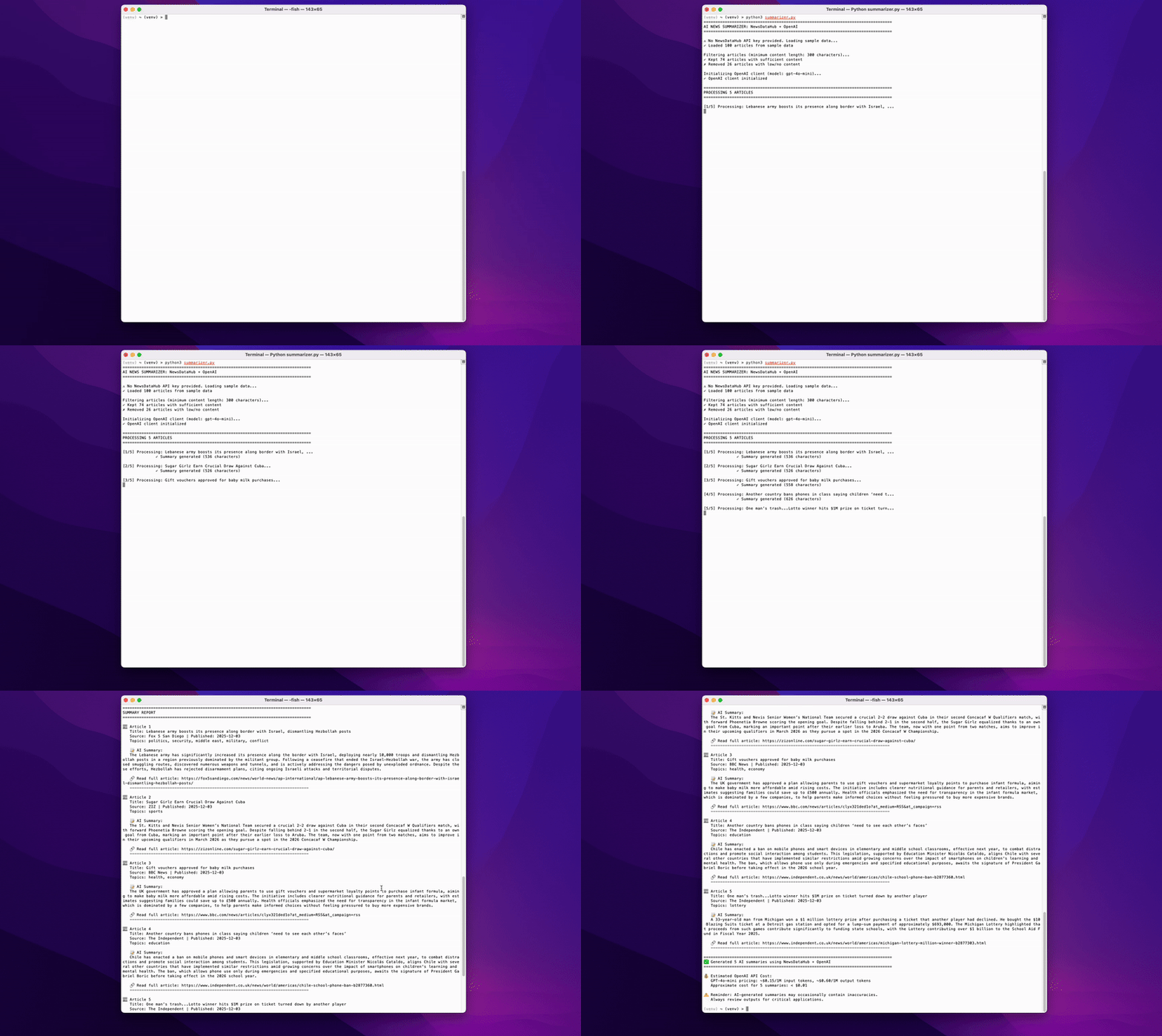
By the end, you’ll understand how to integrate two powerful APIs to automate content summarization for news monitoring, research briefs, or content curation platforms.
⚠️ Important Note About AI Accuracy: AI-generated summaries may occasionally contain inaccuracies, omit important details, or misinterpret nuanced information. Always review AI outputs for critical applications and consider them as assistive tools rather than definitive sources. For high-stakes use cases, implement human review workflows.
Prerequisites
Section titled “Prerequisites”Required Tools
Section titled “Required Tools”- Python 3.7+
- pip package manager
Install Required Packages
Section titled “Install Required Packages”pip install requests openaiAPI Keys
Section titled “API Keys”NewsDataHub API Key (Optional for this tutorial): You don’t need an API key to complete this tutorial. The code automatically downloads sample data from GitHub if no key is provided, so you can follow along immediately.
If you want to fetch live data instead, grab a free key at newsdatahub.com/login. For current API quotas and rate limits, visit newsdatahub.com/plans.
Understanding Article Content and API Tiers
Section titled “Understanding Article Content and API Tiers”NewsDataHub API tiers determine how much article content is returned:
- Free tier: Returns approximately the first 100 characters of each article’s content. This is suitable for testing the API structure but insufficient for AI summarization or NLP workflows.
- Developer tier: Returns full article content. This is required for summarization, entity extraction, semantic analysis, and other AI-driven use cases. Users with Developer tier keys can run this tutorial end-to-end without modifications.
- Professional tier: Includes higher quotas and is designed for production-scale usage.
If you’re using a free tier key, don’t worry—this tutorial includes sample data files with full article content that you can use to follow along and run all code examples successfully.
OpenAI API Key (Required for AI summarization): To generate summaries, you need an OpenAI API key. Get yours at platform.openai.com/api-keys. OpenAI charges per token used — GPT-4o-mini costs approximately $0.15 per 1M input tokens and $0.60 per 1M output tokens, making it extremely affordable for summarization tasks.
Knowledge Prerequisites
Section titled “Knowledge Prerequisites”- Basic Python syntax
- Familiarity with API requests
- Understanding of JSON data structures
- Basic knowledge of file I/O operations
Understanding Abstractive vs Extractive Summarization
Section titled “Understanding Abstractive vs Extractive Summarization”Before we build the pipeline, it’s important to understand the two main approaches to text summarization:
Extractive Summarization:
- Selects and copies the most important sentences directly from the original article
- Output uses exact phrases/sentences from the source
- Example: Original has sentences A, B, C, D, E → Summary uses sentences A, C, E (verbatim)
- Pros: Factually accurate, preserves original phrasing
- Cons: Can feel choppy, less natural flow
Abstractive Summarization (What We’ll Use):
- AI understands the content and generates new sentences that capture the meaning
- Output rewrites the content in new words (like a human would)
- Example: Original discusses economic growth → Summary might say “The economy expanded rapidly due to increased consumer spending”
- Pros: Natural, fluent, concise, can paraphrase complex ideas
- Cons: May occasionally introduce minor inaccuracies (see disclaimer above)
Why we chose abstractive: OpenAI’s GPT models excel at abstractive summarization, producing readable, professional summaries that feel natural and capture the essence of articles concisely.
Step 1: Fetch News Articles from NewsDataHub
Section titled “Step 1: Fetch News Articles from NewsDataHub”We’ll retrieve English-language news articles to analyze. You have two options:
With an API key: The script fetches live data from NewsDataHub (100 English articles).
Without an API key: The script downloads a sample dataset from GitHub, so you can follow along without signing up.
Fetching Articles
Section titled “Fetching Articles”import requestsimport jsonimport osfrom openai import OpenAI
# Set your API keys hereNDH_API_KEY = "" # NewsDataHub API key (or leave empty to use sample data)OPENAI_API_KEY = "your_openai_api_key_here" # Required for summarization
# Check if NewsDataHub API key is providedif NDH_API_KEY and NDH_API_KEY != "your_ndh_api_key_here": print("Using live NewsDataHub API data...")
url = "https://api.newsdatahub.com/v1/news" headers = { "x-api-key": NDH_API_KEY, "User-Agent": "ai-summarization-pipeline/1.0-py" }
# Fetch 100 English articles (single page, no pagination) params = { "per_page": 100, "language": "en", "country": "US,GB,CA,AU", "source_type": "mainstream_news,digital_native" }
response = requests.get(url, headers=headers, params=params) response.raise_for_status() data = response.json()
articles = data.get("data", []) print(f"Fetched {len(articles)} English articles from API")
else: print("No NewsDataHub API key provided. Loading sample data...")
# Download sample data if not already present sample_file = "sample-news-data.json"
if not os.path.exists(sample_file): print("Downloading sample data from GitHub...") sample_url = "https://raw.githubusercontent.com/newsdatahub/newsdatahub-ai-news-summarizer/refs/heads/main/data/sample-news-data.json" response = requests.get(sample_url) response.raise_for_status() with open(sample_file, "w") as f: json.dump(response.json(), f) print(f"Sample data saved to {sample_file}")
# Load sample data with open(sample_file, "r") as f: data = json.load(f)
# Handle both formats: raw array or API response with 'data' key if isinstance(data, dict) and "data" in data: articles = data["data"] elif isinstance(data, list): articles = data else: raise ValueError("Unexpected sample data format")
print(f"Loaded {len(articles)} articles from sample data")Expected output:
Using live NewsDataHub API data...Fetched 100 English articles from APIor if running without the NewsDataHub API key:
No NewsDataHub API key provided. Loading sample data...Downloading sample data from GitHub...Sample data saved to sample-news-data.jsonLoaded 100 articles from sample dataUnderstanding the Code
Section titled “Understanding the Code”NDH_API_KEY - Set to your NewsDataHub API key for live data, or leave empty to use sample data
OPENAI_API_KEY - Required for AI summarization (replace with your actual OpenAI key)
When NDH_API_KEY is provided:
x-api-keyheader — Authenticates your NewsDataHub requestper_pageparameter — Fetches 100 articles (no pagination needed)languageparameter — Filters for English-only articlescountryparameter — Fetches from English-speaking countries (US, UK, Canada, Australia)source_typeparameter — Filters for mainstream and digital-native sources for quality content
When NDH_API_KEY is empty, the else block runs: it downloads sample English news data from the GitHub repository, giving you the same dataset structure without needing API access.
Step 2: Preprocess and Filter Articles
Section titled “Step 2: Preprocess and Filter Articles”Not all articles are suitable for summarization. Some have minimal content (like photo galleries or breaking news alerts with just headlines). We’ll filter out articles with less than 300 characters of content.
Filter Low-Quality Articles
Section titled “Filter Low-Quality Articles”# Filter articles with sufficient contentMIN_CONTENT_LENGTH = 300
filtered_articles = []for article in articles: content = article.get("content", "") if content and len(content) >= MIN_CONTENT_LENGTH: filtered_articles.append(article)
print(f"\nFiltered {len(filtered_articles)} articles with content >= {MIN_CONTENT_LENGTH} characters")print(f"Removed {len(articles) - len(filtered_articles)} articles with insufficient content")Expected output:
Filtered 87 articles with content >= 300 charactersRemoved 13 articles with insufficient contentWhy Filter by Content Length?
Section titled “Why Filter by Content Length?”Articles with very short content are often:
- Breaking news alerts — Just headlines with minimal context
- Photo galleries — Images with brief captions
- Redirects or teasers — Links to full articles elsewhere
- Incomplete data — Partial scrapes or paywalled content
Filtering ensures we only send substantial content to the OpenAI API, saving costs and producing more meaningful summaries.
Step 3: Generate AI Summaries with OpenAI
Section titled “Step 3: Generate AI Summaries with OpenAI”Now we’ll send article content to OpenAI’s GPT-4o-mini model for abstractive summarization. We’ll create a reusable function that generates 2-3 sentence summaries.
Initialize OpenAI Client
Section titled “Initialize OpenAI Client”# Initialize OpenAI clientclient = OpenAI(api_key=OPENAI_API_KEY)
def summarize_article(content, title): """ Generate an abstractive summary of a news article using OpenAI GPT-4o-mini.
Args: content (str): The full article content title (str): The article title (provides context to the AI)
Returns: str: A 2-3 sentence summary, or error message if summarization fails """ try: response = client.chat.completions.create( model="gpt-4o-mini", messages=[ { "role": "system", "content": "You are a professional news summarizer. Create concise, accurate 2-3 sentence summaries that capture the key information and main points of articles." }, { "role": "user", "content": f"Summarize this news article in 2-3 sentences:\n\nTitle: {title}\n\nContent: {content}" } ], max_tokens=150, temperature=0.3 # Lower temperature for more focused, consistent summaries )
summary = response.choices[0].message.content.strip() return summary
except Exception as e: return f"Error generating summary: {str(e)}"Understanding the Summarization Function
Section titled “Understanding the Summarization Function”model="gpt-4o-mini" — Fast, cost-effective model optimized for tasks like summarization
system message — Sets the AI’s behavior as a professional news summarizer
user message — Provides both title and content for better context
max_tokens=150 — Limits output to approximately 2-3 sentences (~100-150 words)
temperature=0.3 — Lower values produce more focused, deterministic summaries (range: 0.0-2.0)
Error handling — Returns error message if API call fails (rate limits, network issues, etc.)
Step 4: Combine NewsDataHub Metadata with AI Summaries
Section titled “Step 4: Combine NewsDataHub Metadata with AI Summaries”Let’s create a data structure that combines the original NewsDataHub article metadata with the AI-generated summary. This is useful for building news dashboards, email digests, or content feeds.
Test Summarization on a Single Article
Section titled “Test Summarization on a Single Article”# Test on the first filtered articletest_article = filtered_articles[0]
print("\n" + "="*80)print("TESTING SUMMARIZATION ON SINGLE ARTICLE")print("="*80)print(f"\nOriginal Title: {test_article.get('title', 'N/A')}")print(f"Source: {test_article.get('source_title', 'N/A')}")print(f"Published: {test_article.get('pub_date', 'N/A')}")print(f"Content length: {len(test_article.get('content', ''))} characters")
# Generate summaryprint("\nGenerating AI summary...")summary = summarize_article( content=test_article.get("content", ""), title=test_article.get("title", ""))
print(f"\nAI Summary:\n{summary}")Expected output:
================================================================================TESTING SUMMARIZATION ON SINGLE ARTICLE================================================================================
Original Title: Major Technology Breakthrough Announced in Quantum ComputingSource: TechCrunchPublished: 2025-01-15T10:30:00ZContent length: 1847 characters
Generating AI summary...
AI Summary:Researchers at MIT have achieved a significant breakthrough in quantum computing by developing a new error-correction technique that could make quantum computers more practical for real-world applications. The technique reduces error rates by 40% compared to previous methods, bringing quantum computing closer to commercial viability. This advancement could accelerate progress in fields like drug discovery, climate modeling, and cryptography.
Step 5: Output Formats
Section titled “Step 5: Output Formats”Now let’s look at different ways to output the summarized data: printing to console, saving to JSON files, or creating structured reports.
Create Structured Output
Section titled “Create Structured Output”def create_summary_output(article, summary): """ Combine NewsDataHub article metadata with AI summary.
Args: article (dict): Original article from NewsDataHub summary (str): AI-generated summary
Returns: dict: Structured output with metadata and summary """ return { "id": article.get("id"), "title": article.get("title"), "source": article.get("source_title"), "published": article.get("pub_date"), "url": article.get("article_link"), "language": article.get("language"), "topics": article.get("topics", []), "original_content_length": len(article.get("content", "")), "ai_summary": summary, "summarized_at": "2025-01-15T12:00:00Z" # You can use datetime.now().isoformat() }
# Create structured output for test articleoutput = create_summary_output(test_article, summary)
# Print formatted JSONprint("\n" + "="*80)print("STRUCTURED OUTPUT (JSON)")print("="*80)print(json.dumps(output, indent=2))Expected output:
================================================================================STRUCTURED OUTPUT (JSON)================================================================================{ "id": "c6d1fc78-2ff3-43e6-9889-2da0ea831262", "title": "Major Technology Breakthrough Announced in Quantum Computing", "source": "TechCrunch", "published": "2025-01-15T10:30:00Z", "url": "https://techcrunch.com/articles/quantum-breakthrough", "language": "en", "topics": ["technology", "science"], "original_content_length": 1847, "ai_summary": "Researchers at MIT have achieved a significant breakthrough...", "summarized_at": "2025-01-15T12:00:00Z"}Step 6: Batch Process Multiple Articles
Section titled “Step 6: Batch Process Multiple Articles”Now let’s process 5 articles in a loop to demonstrate how you’d build a production summarization pipeline. This is useful for automated news briefings, daily digests, or content monitoring systems.
Summarize 5 Articles
Section titled “Summarize 5 Articles”# Process first 5 articles with sufficient contentNUM_ARTICLES_TO_PROCESS = 5
print("\n" + "="*80)print(f"PROCESSING {NUM_ARTICLES_TO_PROCESS} ARTICLES")print("="*80)
summarized_articles = []
for i, article in enumerate(filtered_articles[:NUM_ARTICLES_TO_PROCESS], 1): print(f"\n[{i}/{NUM_ARTICLES_TO_PROCESS}] Processing: {article.get('title', 'N/A')[:60]}...")
# Generate summary summary = summarize_article( content=article.get("content", ""), title=article.get("title", "") )
# Create structured output output = create_summary_output(article, summary) summarized_articles.append(output)
print(f" ✓ Summary generated ({len(summary)} characters)")
print(f"\n✓ Successfully processed {len(summarized_articles)} articles")Expected output:
================================================================================PROCESSING 5 ARTICLES================================================================================
[1/5] Processing: Major Technology Breakthrough Announced in Quantum Comput...    ✓ Summary generated (287 characters)
[2/5] Processing: Global Climate Summit Reaches Historic Agreement on Emis...    ✓ Summary generated (312 characters)
[3/5] Processing: New Study Reveals Surprising Health Benefits of Mediterr...    ✓ Summary generated (265 characters)
[4/5] Processing: Stock Markets Rally as Federal Reserve Signals Interest ...    ✓ Summary generated (298 characters)
[5/5] Processing: Scientists Discover Potentially Habitable Exoplanet 40 L...    ✓ Summary generated (301 characters)
✓ Successfully processed 5 articles
Save Results to JSON File
Section titled “Save Results to JSON File”# Save to JSON fileoutput_file = "summarized_articles.json"
with open(output_file, "w") as f: json.dump(summarized_articles, f, indent=2)
print(f"\n✓ Results saved to {output_file}")print(f" Total articles: {len(summarized_articles)}")print(f" File size: {os.path.getsize(output_file)} bytes")Step 7: Display Results in Readable Format
Section titled “Step 7: Display Results in Readable Format”Let’s create a clean, human-readable display of our summarized articles for quick review.
Print Summary Report
Section titled “Print Summary Report”print("\n" + "="*80)print("SUMMARY REPORT")print("="*80)
for i, article in enumerate(summarized_articles, 1): print(f"\n📰 Article {i}") print(f" Title: {article['title']}") print(f" Source: {article['source']} | Published: {article['published'][:10]}") print(f" Topics: {', '.join(article['topics']) if article['topics'] else 'N/A'}") print(f"\n 📝 AI Summary:") print(f" {article['ai_summary']}\n") print(f" 🔗 Read full article: {article['url']}") print(f" {'-'*76}")
print(f"\n✅ Generated {len(summarized_articles)} AI summaries using NewsDataHub + OpenAI")Complete Working Script
Section titled “Complete Working Script”Here’s the full code combining all steps:
import requestsimport jsonimport osfrom openai import OpenAI
# ============================================================================# CONFIGURATION# ============================================================================
# Set your API keys hereNDH_API_KEY = ""  # NewsDataHub API key (or leave empty to use sample data)OPENAI_API_KEY = ""  # Required for summarization
# Configuration parametersMIN_CONTENT_LENGTH = 300  # Minimum characters for article contentNUM_ARTICLES_TO_PROCESS = 5  # Number of articles to summarize
# ============================================================================# STEP 1: FETCH NEWS ARTICLES FROM NEWSDATAHUB# ============================================================================
print("="*80)print("AI NEWS SUMMARIZER: NewsDataHub + OpenAI")print("="*80)
# Check if NewsDataHub API key is providedif NDH_API_KEY and NDH_API_KEY != "your_ndh_api_key_here":    print("\n✓ Using live NewsDataHub API data...")
    url = "https://api.newsdatahub.com/v1/news"    headers = {        "x-api-key": NDH_API_KEY,        "User-Agent": "ai-summarization-pipeline/1.0-py"    }
    # Fetch 100 English articles (single page, no pagination)    params = {        "per_page": 100,        "language": "en",  # English articles only        "country": "US,GB,CA,AU",  # English-speaking countries        "source_type": "mainstream_news"  # Quality sources    }
    response = requests.get(url, headers=headers, params=params)    response.raise_for_status()    data = response.json()
    articles = data.get("data", [])    print(f"✓ Fetched {len(articles)} English articles from NewsDataHub API")
else:    print("\n⚠ No NewsDataHub API key provided. Loading sample data...")
    # Download sample data if not already present    sample_file = "sample-news-data.json"
    if not os.path.exists(sample_file):        print("  Downloading sample data from GitHub...")        sample_url = "https://raw.githubusercontent.com/newsdatahub/newsdatahub-ai-news-summarizer/refs/heads/main/data/sample-news-data.json"        response = requests.get(sample_url)        response.raise_for_status()        with open(sample_file, "w") as f:            json.dump(response.json(), f)        print(f"  ✓ Sample data saved to {sample_file}")
    # Load sample data    with open(sample_file, "r") as f:        data = json.load(f)
    # Handle both formats: raw array or API response with 'data' key    if isinstance(data, dict) and "data" in data:        articles = data["data"]    elif isinstance(data, list):        articles = data    else:        raise ValueError("Unexpected sample data format")
    print(f"✓ Loaded {len(articles)} articles from sample data")
# ============================================================================# STEP 2: FILTER ARTICLES WITH SUFFICIENT CONTENT# ============================================================================
print(f"\nFiltering articles (minimum content length: {MIN_CONTENT_LENGTH} characters)...")
filtered_articles = []for article in articles:    content = article.get("content", "")    if content and len(content) >= MIN_CONTENT_LENGTH:        filtered_articles.append(article)
print(f"✓ Kept {len(filtered_articles)} articles with sufficient content")print(f"✗ Removed {len(articles) - len(filtered_articles)} articles with low/no content")
if len(filtered_articles) == 0:    print("\n⚠ ERROR: No articles with sufficient content found!")    print("  Try lowering MIN_CONTENT_LENGTH or using different filters.")    exit(1)
# ============================================================================# STEP 3: INITIALIZE OPENAI CLIENT & SUMMARIZATION FUNCTION# ============================================================================
print(f"\nInitializing OpenAI client (model: gpt-4o-mini)...")
# Validate OpenAI API keyif not OPENAI_API_KEY or OPENAI_API_KEY == "your_openai_api_key_here":    print("\n⚠ ERROR: OpenAI API key not set!")    print("  Please add your OpenAI API key to the OPENAI_API_KEY variable.")    print("  Get your key at: https://platform.openai.com/api-keys")    exit(1)
# Initialize OpenAI clientclient = OpenAI(api_key=OPENAI_API_KEY)
print("✓ OpenAI client initialized")

def summarize_article(content, title):    """    Generate an abstractive summary of a news article using OpenAI GPT-4o-mini.
    Args:        content (str): The full article content        title (str): The article title (provides context to the AI)
    Returns:        str: A 2-3 sentence summary, or error message if summarization fails    """    try:        response = client.chat.completions.create(            model="gpt-4o-mini",            messages=[                {                    "role": "system",                    "content": "You are a professional news summarizer. Create concise, accurate 2-3 sentence summaries that capture the key information and main points of articles."                },                {                    "role": "user",                    "content": f"Summarize this news article in 2-3 sentences:\n\nTitle: {title}\n\nContent: {content}"                }            ],            max_tokens=150,  # ~100-150 words for 2-3 sentences            temperature=0.3  # Lower temperature for consistent, focused summaries        )
        summary = response.choices[0].message.content.strip()        return summary
    except Exception as e:        return f"Error generating summary: {str(e)}"

# ============================================================================# STEP 4: CREATE STRUCTURED OUTPUT FUNCTION# ============================================================================
def create_summary_output(article, summary):    """    Combine NewsDataHub article metadata with AI-generated summary.
    Args:        article (dict): Original article from NewsDataHub        summary (str): AI-generated summary
    Returns:        dict: Structured output with metadata and summary    """    return {        "id": article.get("id"),        "title": article.get("title"),        "source": article.get("source_title"),        "published": article.get("pub_date"),        "url": article.get("article_link"),        "language": article.get("language"),        "topics": article.get("topics", []),        "original_content_length": len(article.get("content", "")),        "ai_summary": summary    }

# ============================================================================# STEP 5: PROCESS ARTICLES AND GENERATE SUMMARIES# ============================================================================
print("\n" + "="*80)print(f"PROCESSING {NUM_ARTICLES_TO_PROCESS} ARTICLES")print("="*80)
summarized_articles = []
for i, article in enumerate(filtered_articles[:NUM_ARTICLES_TO_PROCESS], 1):    # Display progress    title_preview = article.get("title", "N/A")[:60]    print(f"\n[{i}/{NUM_ARTICLES_TO_PROCESS}] Processing: {title_preview}...")
    # Generate AI summary    summary = summarize_article(        content=article.get("content", ""),        title=article.get("title", "")    )
    # Create structured output    output = create_summary_output(article, summary)    summarized_articles.append(output)
    # Display result    print(f"              ✓ Summary generated ({len(summary)} characters)")
print(f"\n{'='*80}")print(f"✓ Successfully processed {len(summarized_articles)} articles")print("="*80)
# ============================================================================# STEP 6: SAVE RESULTS TO JSON FILE# ============================================================================
output_file = "summarized_articles.json"
with open(output_file, "w") as f:    json.dump(summarized_articles, f, indent=2)
print(f"\n✓ Results saved to {output_file}")print(f"  Total articles: {len(summarized_articles)}")print(f"  File size: {os.path.getsize(output_file):,} bytes")
# ============================================================================# STEP 7: DISPLAY SUMMARY REPORT# ============================================================================
print("\n" + "="*80)print("SUMMARY REPORT")print("="*80)
for i, article in enumerate(summarized_articles, 1):    print(f"\n📰 Article {i}")    print(f"   Title: {article['title']}")    print(f"   Source: {article['source']} | Published: {article['published'][:10]}")
    # Display topics if available    if article['topics']:        topics_str = ', '.join(article['topics'])        print(f"   Topics: {topics_str}")
    # Display AI summary    print(f"\n   📝 AI Summary:")    print(f"   {article['ai_summary']}\n")
    # Display full article link    print(f"   🔗 Read full article: {article['url']}")    print(f"   {'-'*76}")
# ============================================================================# FINAL OUTPUT# ============================================================================
print(f"\n{'='*80}")print(f"✅ Generated {len(summarized_articles)} AI summaries using NewsDataHub + OpenAI")print(f"{'='*80}\n")
# Display cost estimationprint("💰 Estimated OpenAI API Cost:")print("   GPT-4o-mini pricing: ~$0.15/1M input tokens, ~$0.60/1M output tokens")print(f"   Approximate cost for {len(summarized_articles)} summaries: < $0.01")print("\n⚠️  Reminder: AI-generated summaries may occasionally contain inaccuracies.")print("   Always review outputs for critical applications.\n")
To run:
- Install required packages:
pip install requests openai - Replace
your_openai_api_key_herewith your actual OpenAI API key - Optionally add your NewsDataHub API key (or leave empty to use sample data)
- Save as
summarizer.py - Run:
python summarizer.py - Check
summarized_articles.jsonfor output
Cost Estimation
Section titled “Cost Estimation”OpenAI API Costs (GPT-4o-mini):
- Input: ~$0.15 per 1M tokens
- Output: ~$0.60 per 1M tokens
Example calculation for 100 articles:
- Average article: 1,500 characters (~375 tokens)
- Average summary: 250 characters (~60 tokens)
- Total input tokens: 100 × 375 = 37,500 tokens
- Total output tokens: 100 × 60 = 6,000 tokens
- Cost: ~$0.01 (one cent for 100 summaries)
Summarization with GPT-4o-mini is extremely affordable, making it practical for high-volume applications.
Best Practices for Production Use
Section titled “Best Practices for Production Use”1. Implement Rate Limiting
Section titled “1. Implement Rate Limiting”Both NewsDataHub and OpenAI have rate limits. Add delays between requests to avoid hitting limits and prevent throttling errors that would interrupt your pipeline:
import time
for article in articles:    summary = summarize_article(article["content"], article["title"])    time.sleep(0.1)  # 100ms delay between requests
This is especially important when processing hundreds or thousands of articles—even a small delay prevents rate limit errors without significantly impacting total processing time.
2. Add Retry Logic for API Failures
Section titled “2. Add Retry Logic for API Failures”API calls can fail due to network issues, temporary server errors, or rate limits. Retry logic with exponential backoff automatically recovers from transient failures:
from time import sleep
def summarize_with_retry(content, title, max_retries=3):    for attempt in range(max_retries):        try:            return summarize_article(content, title)        except Exception as e:            if attempt < max_retries - 1:                sleep(2 ** attempt)  # Exponential backoff                continue            return f"Failed after {max_retries} attempts: {str(e)}"
Exponential backoff (1s, 2s, 4s delays) prevents overwhelming the API during high-load periods while giving temporary issues time to resolve.
3. Cache Results to Avoid Redundant API Calls
Section titled “3. Cache Results to Avoid Redundant API Calls”Caching prevents re-summarizing the same articles when you run your pipeline multiple times—essential when iterating on your code, tweaking prompts, or reprocessing datasets:
import hashlib
# Create a cache directoryos.makedirs("cache", exist_ok=True)
def get_cached_summary(article_id, content, title):    cache_file = f"cache/{article_id}.json"
    # Return cached summary if exists    if os.path.exists(cache_file):        with open(cache_file, "r") as f:            return json.load(f)["summary"]
    # Generate new summary and cache it    summary = summarize_article(content, title)    with open(cache_file, "w") as f:        json.dump({"summary": summary}, f)
    return summary
This saves significant API costs during development—if you’re testing visualization changes or output formatting, you’ll reuse existing summaries instead of paying for them again.
4. Monitor API Usage
Section titled “4. Monitor API Usage”Track your OpenAI token usage to avoid unexpected costs and understand your actual spending per article:
total_input_tokens = 0total_output_tokens = 0
response = client.chat.completions.create(...)total_input_tokens += response.usage.prompt_tokenstotal_output_tokens += response.usage.completion_tokens
print(f"Total tokens used: {total_input_tokens + total_output_tokens}")print(f"Estimated cost: ${(total_input_tokens * 0.15 + total_output_tokens * 0.60) / 1_000_000:.4f}")
Monitoring helps you optimize prompts for cost-efficiency—you might discover that shorter system prompts or removing unnecessary context reduces costs by 20-30% without affecting summary quality.
- What’s the difference between abstractive and extractive summarization?
Extractive pulls exact sentences from the original text, while abstractive (what we use) generates new sentences that capture the meaning. Abstractive produces more natural, fluent summaries but may occasionally introduce minor inaccuracies.
- Why use GPT-4o-mini instead of GPT-4?
GPT-4o-mini is optimized for focused tasks like summarization, costs ~30x less than GPT-4, and produces excellent results for this use case. For most summarization tasks, the quality difference is negligible.
- How accurate are AI-generated summaries?
AI summaries are generally accurate but may occasionally miss nuances, omit details, or misinterpret complex information. Always review outputs for critical applications and implement human oversight for high-stakes use cases.
- Can I summarize articles in languages other than English?
Yes! Both NewsDataHub and OpenAI support multiple languages. Remove the language: "en" parameter from NewsDataHub and GPT-4o-mini will automatically detect and summarize in the source language.
- How do I adjust summary length?
Modify the max_tokens parameter (150 tokens ≈ 100-150 words) and update the system prompt:
"content": "Create a 1-sentence summary..." # For shorter summaries"content": "Create a 5-sentence summary..." # For longer summaries- What if my NewsDataHub API key doesn’t work?
Verify:
- Key is correct (check your dashboard)
- Header name is
x-api-key(lowercase, with hyphens) - You haven’t exceeded rate limits
- Network/firewall isn’t blocking requests
- Can I process more than 5 articles?
Yes! Change NUM_ARTICLES_TO_PROCESS to any number. For large batches, implement the rate limiting and caching strategies in Best Practices to avoid API issues and reduce costs.
- How fresh is the NewsDataHub data?
Data freshness varies by tier:
- Free: 48-hour delay
- Developer/Professional: Real-time to 1-hour delay
- Business/Enterprise: Real-time
Visit newsdatahub.com/plans for details.
Learn More
Section titled “Learn More”Related Tutorials:
Resources:
Ready to start building AI-powered news tools?
Get your free NewsDataHub API key | Get OpenAI API key | Browse tutorials